Screenshots were never the expensive part.
2026 shipped an AI browser from almost every lab within the same few months: OpenAI's Atlas, Perplexity's Comet, Anthropic's Claude in Chrome, and Google's Chrome Auto Browse. Under the hood, every one of them runs the same loop — look at the page, decide on an action, take the action, look again — and every one of them made the same hidden design decision somewhere in that loop: how does the agent actually see the page?
That single choice, usually made once by whoever wired up the agent's tools and never revisited, is the biggest single lever on what a browsing agent costs to run. Not the model. Not the task complexity. The page representation.
Four ways to show a page to a model.
| Approach | How the agent sees the page | Tokens for a 10-step task | Needs the site's cooperation? |
|---|---|---|---|
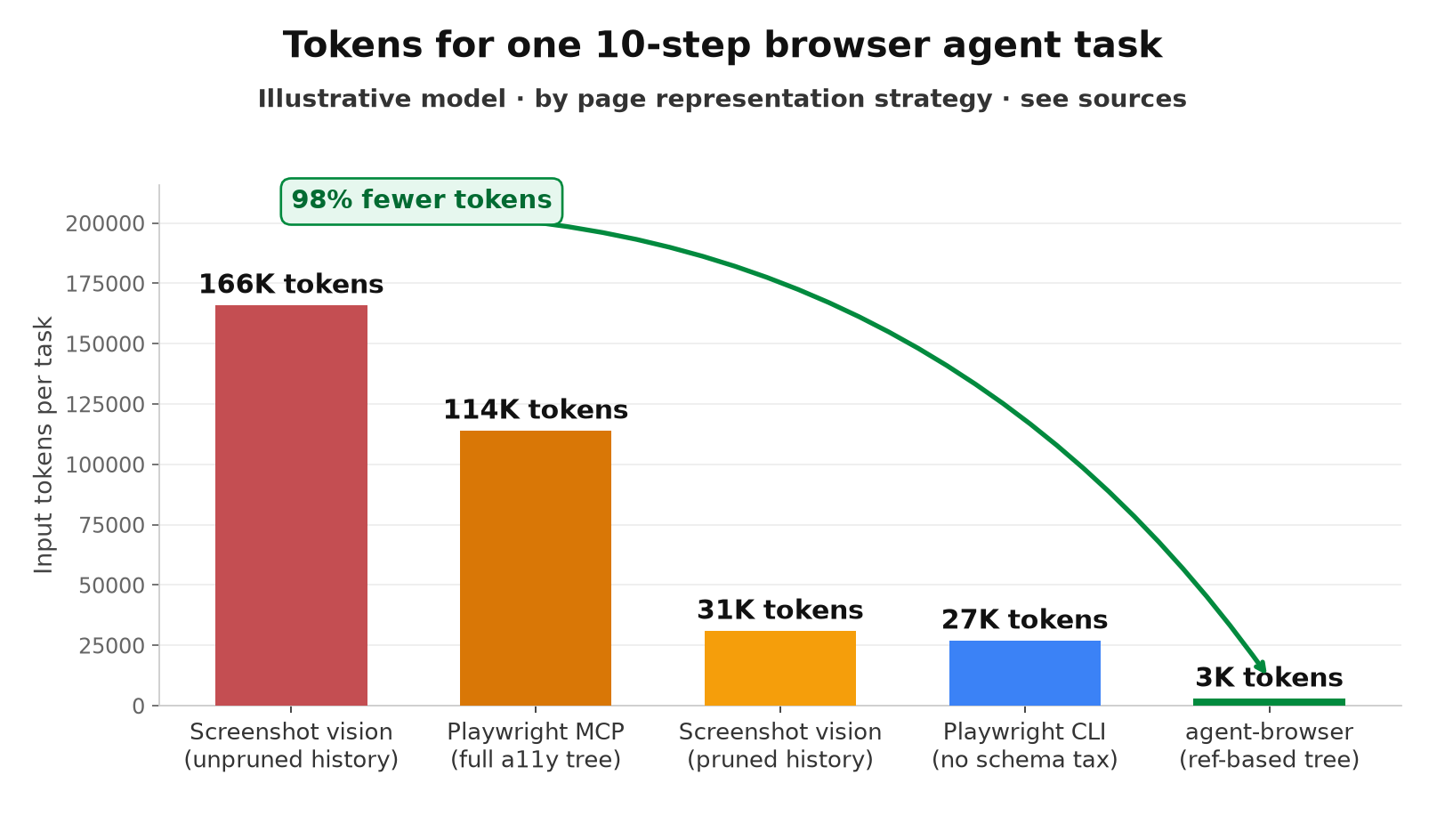
| Screenshot vision (Claude Computer Use, OpenAI computer-use-preview) | Full-resolution image, re-sent every turn unless pruned | 31,000 (pruned) to 166,000+ (unpruned history) | No |
| Playwright MCP (full accessibility-tree dump) | Complete ARIA tree plus JSON-Schema tool definitions | ~114,000 | No |
| Playwright CLI (same tree, no MCP schema tax) | Complete ARIA tree, no repeated tool-definition JSON | ~27,000 | No |
| agent-browser (Vercel, ref-based tree) | Compact list of interactive elements with @refs | ~3,000 | No |
| WebMCP (Chrome, native) | Structured function call the website itself exposes | Site-dependent, ~89% below the screenshot baseline | Yes — the site must implement it |
The two approaches on the extreme ends of that table are handling the exact same 10-step task on the exact same website. One costs 55 times more than the other, in tokens, before either one gets to the part of the task that actually matters.
Where the tokens go when the agent takes a screenshot.
Anthropic documents the computer use tool's overhead precisely: 466 to 499 tokens of system-prompt instructions for the beta feature, 735 tokens for the tool definition, and 2,000 to 5,000 tokens per screenshot depending on resolution. Source: Anthropic, "Computer use tool," Claude Platform Docs. None of that is a flaw in the tool. Screenshots are the only representation that works when the interface is a canvas, a video call, or a legacy desktop application with no accessibility layer underneath it.
The problem shows up one layer up, in how the agent loop is assembled. An agent loop is a conversation, and a conversation resends its history on every turn by default. If nothing prunes prior screenshots out of context, a 10-step task doesn't pay for 10 screenshots — turn 1 carries 1, turn 2 carries 2, turn 10 carries all 10 again, for 55 screenshot-equivalents billed across a single task instead of 10. It's the same quadratic accumulation pattern documented in tool schemas that resend on every agent turn and in multi-turn conversations that re-bill your first message a dozen times over — except every "message" here is a 2,000-to-5,000-token image instead of a paragraph of text, so the per-turn cost of forgetting to prune is an order of magnitude higher. One vendor pitching the accessibility-tree alternative puts the unoptimized version of this at over 500,000 tokens for a 10-step task. Source: "Chrome's WebMCP Promises 89% Token Savings," AgentMarketCap, April 2026. Our modeled estimate below is more conservative — 166,000 tokens for the unpruned case — but the shape of the curve, and the fix, are the same.
Anthropic ships a fix for exactly this: clear_tool_uses_20250919 automatically drops the oldest tool results, including old screenshots, once a session crosses a configured token threshold. It's the same context-editing mechanism covered in our piece on context rot, and applying it to a computer-use loop is close to a 5x reduction on its own — from 166,000 tokens down to roughly 31,000 for the pruned case in the table above.
The DOM alternative isn't automatically cheap either.
The instinct once you've read the paragraph above is to conclude the fix is "don't use screenshots, use the accessibility tree." That's directionally right and still leaves most of the savings on the table, because accessibility-tree representations vary by close to 40x depending on how they're delivered.
Playwright's MCP server returns the full ARIA accessibility tree on every step: every element, every property, console messages, the works. A benchmarked 10-step task through Playwright MCP costs roughly 114,000 tokens, and 13,700 of those tokens are the one-time JSON-Schema tool definitions the MCP protocol requires every session to reload. Source: "Playwright CLI vs agent-browser vs Claude in Chrome — AI browser automation token benchmark," ytyng.com, 2026. Swapping the MCP server for the Playwright CLI — same underlying accessibility tree, no repeated tool-schema tax — drops the same benchmarked task to roughly 27,000 tokens, a 4x reduction with no change to what the agent can actually do.
Vercel's open-source agent-browser goes further by changing what gets returned, not just how it's delivered. Instead of a full tree dump, it returns a compact snapshot of interactive elements only, each tagged with a short reference like @e1, so the agent can act on an element without re-parsing the whole page. A typical page snapshot runs 200 to 400 tokens, and the tool reports 82 to 93% fewer tokens than Playwright MCP on comparable tasks, putting a 10-step task at roughly 3,000 tokens total. Source: Vercel Labs, agent-browser; "The Context Wars: Why Your Browser Tools Are Bleeding Tokens," paddo.dev. The same report notes that Anthropic's own Tool Search feature on Opus 4.5 cuts tool-definition overhead from 72,000 tokens down to 500 by loading tool schemas on demand rather than up front — a second, complementary fix for the schema-tax half of the problem.
Chrome's WebMCP is a bet on a third path entirely: skip the "read the page" step and let the website hand the agent a callable function instead. A flight-booking site could expose a searchFlights tool with typed parameters directly, so the agent never screenshots a form or parses a DOM to find the departure-date field. The W3C published a WebMCP Draft Community Group Report on February 10, 2026, and Chrome 146 shipped an early preview behind a flag that same month, reporting an 89% token efficiency improvement over screenshot-based automation. Source: AgentMarketCap, April 2026. It is the cheapest representation on the table when it's available, and it is available on approximately none of the web today — Firefox and Safari have only committed to the W3C process, and no site is required to implement it. For the other 99% of the internet, the representation choice above is still yours to make.
What this costs at scale.
Token counts alone hide an important detail: screenshots and DOM text usually run through different models. A screenshot needs a model that can parse pixels; a compact list of @e1, @e2 element refs can run through the cheapest capable text model you have. Pricing the table above at Claude Opus 4.8 rates for vision steps ($5/M input, $25/M output) and Claude Sonnet 4.6 rates for text-only DOM steps ($3/M input, $15/M output) gives the monthly cost at a modest 10,000 browsing tasks a day:
| Approach | Tokens/task | Cost/task | Monthly cost at 10K tasks/day |
|---|---|---|---|
| Screenshot vision, unpruned history | 166,000 | $0.87 | $260,000 |
| Playwright MCP (full a11y tree) | 114,000 | $0.36 | $109,000 |
| Screenshot vision, pruned history | 31,000 | $0.19 | $58,000 |
| Playwright CLI (no schema tax) | 27,000 | $0.10 | $31,000 |
| agent-browser (ref-based tree) | 3,000 | $0.03 | $9,000 |
Notice that Playwright MCP, despite carrying more raw tokens than a pruned screenshot loop, ends up cheaper in dollars — because DOM text bills as ordinary input tokens on a cheap text model, while every screenshot byte bills as vision input on whichever model is capable of reading it. Token count and dollar cost don't always move together once two different model classes are in play, which is exactly the kind of detail a fixed "always use model X" agent configuration misses and a routing layer catches automatically.
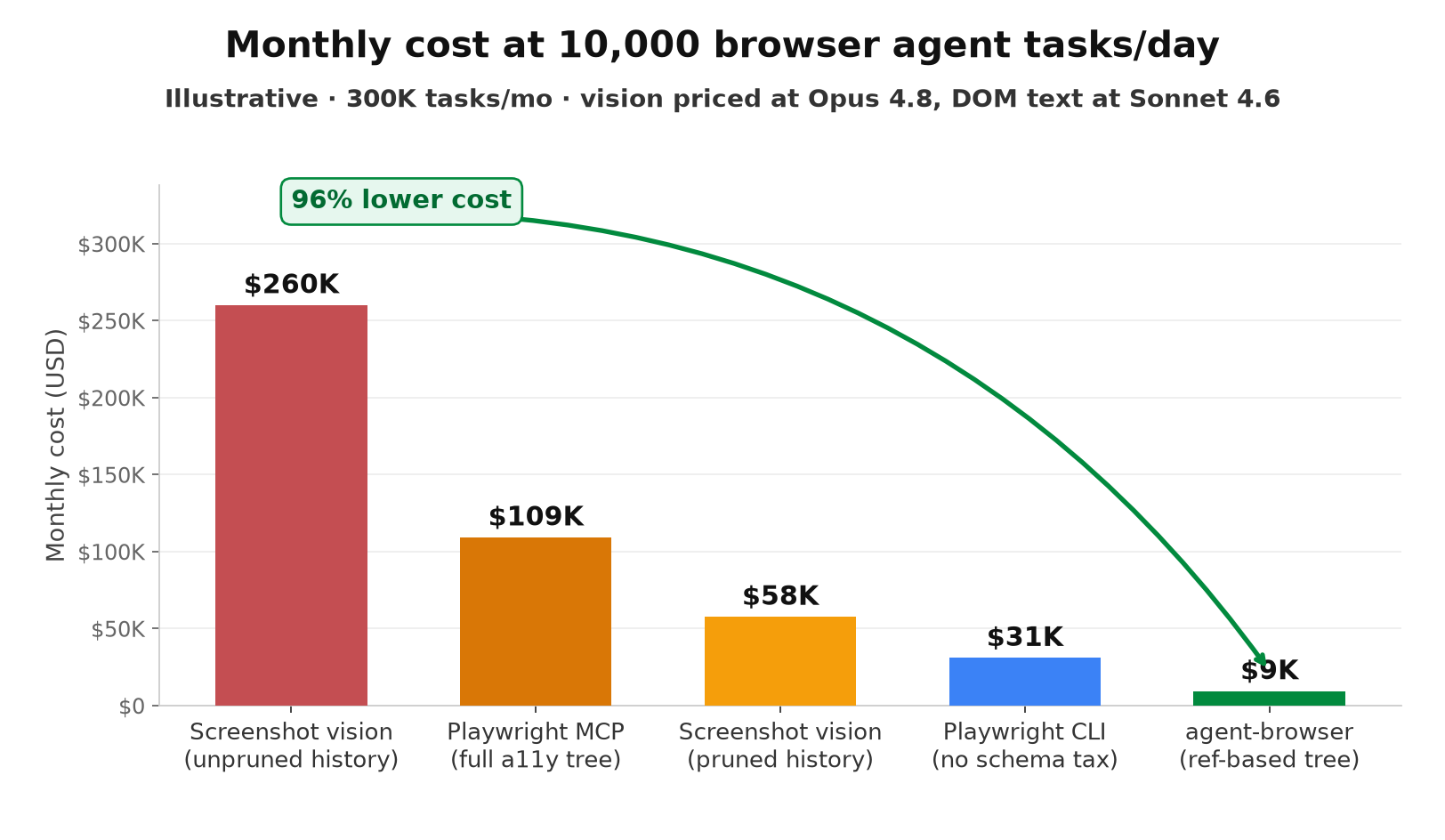
These are illustrative figures modeled from the published benchmarks cited above, not measurements from a single production system — your actual numbers depend on page complexity, screenshot resolution, session length, and how aggressively you prune history. The direction and the order of magnitude are the part worth taking seriously.
Implementation: a hybrid step function that only pays for vision when it needs to.
Most teams don't need to pick one representation and commit to it everywhere. A page with a canvas-based chart, a captcha, or a custom video player genuinely needs a screenshot. A standard form, a table, or a nav menu doesn't. The following step function tries the cheap representation first and only escalates to a screenshot when the accessibility tree can't answer the question.
from dataclasses import dataclass

VISION_FALLBACK_TAGS = {"canvas", "video", "svg", "embed"}
MIN_LABELED_ELEMENTS = 2

@dataclass
class PageSnapshot:
    interactive_elements: list  # [{"ref": "@e1", "role": "button", "label": "Submit"}, ...]
    unlabeled_region_tags: set  # tag names found with no accessible label


def needs_screenshot(snapshot: PageSnapshot) -> bool:
    """Escalate to vision only when the a11y tree can't describe the page."""
    if snapshot.unlabeled_region_tags & VISION_FALLBACK_TAGS:
        return True
    if len(snapshot.interactive_elements) < MIN_LABELED_ELEMENTS:
        return True
    return False


def observe_page(page, history: list) -> dict:
    """Cheap path by default. Vision only on genuine need. Old
    screenshots are dropped from history every turn, mirroring
    Anthropic's clear_tool_uses context-editing behavior."""
    snapshot = page.accessibility_snapshot()  # ~200-400 tokens, agent-browser style

    if not needs_screenshot(snapshot):
        return {"mode": "a11y_tree", "payload": snapshot.interactive_elements, "model": "sonnet-4-6"}

    history[:] = [turn for turn in history if turn.get("mode") != "screenshot"]
    return {"mode": "screenshot", "payload": page.screenshot(), "model": "opus-4-8"}
Route the two branches to different models — a compact accessibility-tree observation to a cheap text model, a screenshot to a vision-capable one — and the loop pays frontier vision pricing only for the steps that structurally require it. That routing decision is exactly what a proxy layer sitting in front of your model calls is built to make automatically, per request, instead of per hardcoded agent config.
Nadir sits in that position: point your browser agent's OpenAI-compatible calls at Nadir with model=auto, and vision-carrying requests route to a model that can handle images while everything else routes to the cheapest model that can still do the job, without a special case in your agent code for every content type. Context Optimize applies the same deterministic compression pass this blog covers elsewhere, deduplicating tool schemas and minifying JSON accessibility-tree payloads, before either kind of request is billed, and prompt caching on the parts of your browsing session that don't change turn to turn (the tool definitions, the system prompt, the site's static navigation chrome) captures the rest.
Checklist before you ship a browser agent.
- Measure your current representation. Log input tokens per step, broken out by screenshot bytes versus accessibility-tree text. Most teams have never separated the two.
- Prune screenshot history. If your loop keeps every prior screenshot in context, this is the single highest-leverage fix available — often a 5x reduction on its own.
- Default to the accessibility tree; escalate to vision on specific signals. Canvas, video, SVG-heavy regions, and captchas are real reasons to screenshot. A standard form is not.
- Route by content type, not by task. A step that reads a compact element list doesn't need the same model as a step reading a screenshot.
- Re-benchmark before adopting WebMCP. It's the cheapest option where it's implemented, but audit which of your target sites actually support it before rearchitecting around it — most don't yet.
Conclusion.
The lesson from 2026's browser-agent launches isn't "vision is expensive, avoid it." It's that the representation choice made once, early, by whoever configured the agent's tools, swings the token bill by close to two orders of magnitude — and most of that swing has nothing to do with whether the task used a screenshot at all. Playwright MCP and Playwright CLI parse the identical accessibility tree and differ 4x in tokens purely on delivery format. Screenshot loops that prune history cost a fifth of the ones that don't, with zero change to what the agent can see. The fix is not a new model. It's measuring which representation each step actually needs, and routing accordingly.
Data in this post is illustrative, modeled from the published benchmarks and documentation cited throughout, not derived from proprietary production traces. Sources: [Anthropic, "Computer use tool," Claude Platform Docs](https://platform.claude.com/docs/en/agents-and-tools/tool-use/computer-use-tool). ["Playwright CLI vs agent-browser vs Claude in Chrome," ytyng.com, 2026](https://www.ytyng.com/en/blog/ai-browser-automation-tools-comparison-2026). [Vercel Labs, agent-browser (GitHub)](https://github.com/vercel-labs/agent-browser). ["The Context Wars: Why Your Browser Tools Are Bleeding Tokens," paddo.dev](https://paddo.dev/blog/agent-browser-context-efficiency/). ["Chrome's WebMCP Promises 89% Token Savings," AgentMarketCap, April 2026](https://agentmarketcap.ai/blog/2026/04/07/chrome-firefox-native-agent-apis-2026-browser-agentic-primitives). Anthropic, Claude Opus 4.8 and Sonnet 4.6 pricing, 2026.